Look for clues to concealed electronics. Some electronic components produce magnetic fields that your iPhone’s magnetometer may detect at close range—even without a recognizable wireless broadcast. Use the magnetic meter in Area Sweep during a careful physical inspection of accessible places you are allowed to inspect.
Use repeatable changes to decide where to take a closer physical look, not as proof of a hidden device. It cannot identify a device, measure its distance, reveal its intent, or prove that it is recording.
Ordinary speakers, magnets, wiring, chargers, magnetic metal, and phone accessories can all affect readings. Some cameras, microphones, and other electronics produce little measurable change. No change is not an all-clear.
Aim the sensor, not the whole phone
The sensor occupies one small point and its position varies by model. On iPhone 17 Pro Max, Apple's dimensional drawing places the compass in the lower-back area near the USB-C end—not the camera area. Do not apply this location to every iPhone. A sensor-location check with a familiar object is more useful than assuming the camera or contactless-payment area is the correct point.
Practice before a sweep
- In Guide, open Reading the magnetic meter, choose Practice with the magnetometer, then tap Start Practice. Practice is also available before a magnetic Area Sweep.
- Compare an ordinary speaker you own with a spot away from electronics. Remove magnetic accessories if practical.
- Keep a gap. Move slowly over the same spot, holding the angle and distance consistent. Never press strong magnets against the phone or open equipment.
- Watch Actual Field and Δ Reference. Repeat the pass and learn which phone positions produce a repeatable response; do not aim for a particular number.
Practice does not collect Bluetooth or local-network findings, create exports, or save a session. Stop Practice, Done, or leaving the app clears the readings. Returning does not resume measurement; tap Start Practice when ready. Practice is familiarization, not calibration or a pass/fail hardware test.
Use magnetic measurements in an Area Sweep
- On Scan, choose Area Sweep, select Motion and magnetic, and tap Continue. Bluetooth and local-network discovery are separate choices; you can use magnetic measurements on their own.
- Follow the preparation and access guidance, then tap Begin Area Sweep. Keep Spectra visible and your iPhone unlocked. Pause away from obvious magnets or electronics so a stable display reference can form.
- Move slowly through accessible areas you are allowed to inspect. Keep the sensor position, angle, and gap consistent. Watch Actual Field or Δ Reference, then repeat any noticeable change over the same spot. A change is a clue, not an identified device.
- Choose Finish Area Sweep when ready. Review Coverage, the magnetic events, and Review graph when graph data is available. Check the saved status before closing. Automatic saving follows your Save completed sessions preference. With automatic saving off, choose Save Session to keep just this check without changing your preference.
Area Sweep initially allows 30 minutes. A notice five minutes before the deadline lets you extend or finish; if you do nothing, collection ends at the deadline. This does not enable background measurement or remove graph-retention limits.
Understand the numbers
- Actual Field shows the measured field in microteslas (µT). The reading card is labeled Actual field.
- Δ Reference shows the signed difference from your display reference. Its reading card is labeled Delta from reference. A larger magnitude means a larger field change, not proven proximity.
- Rebuild Reference chooses a fresh display comparison. It does not reset the independent event detector or erase recorded events.
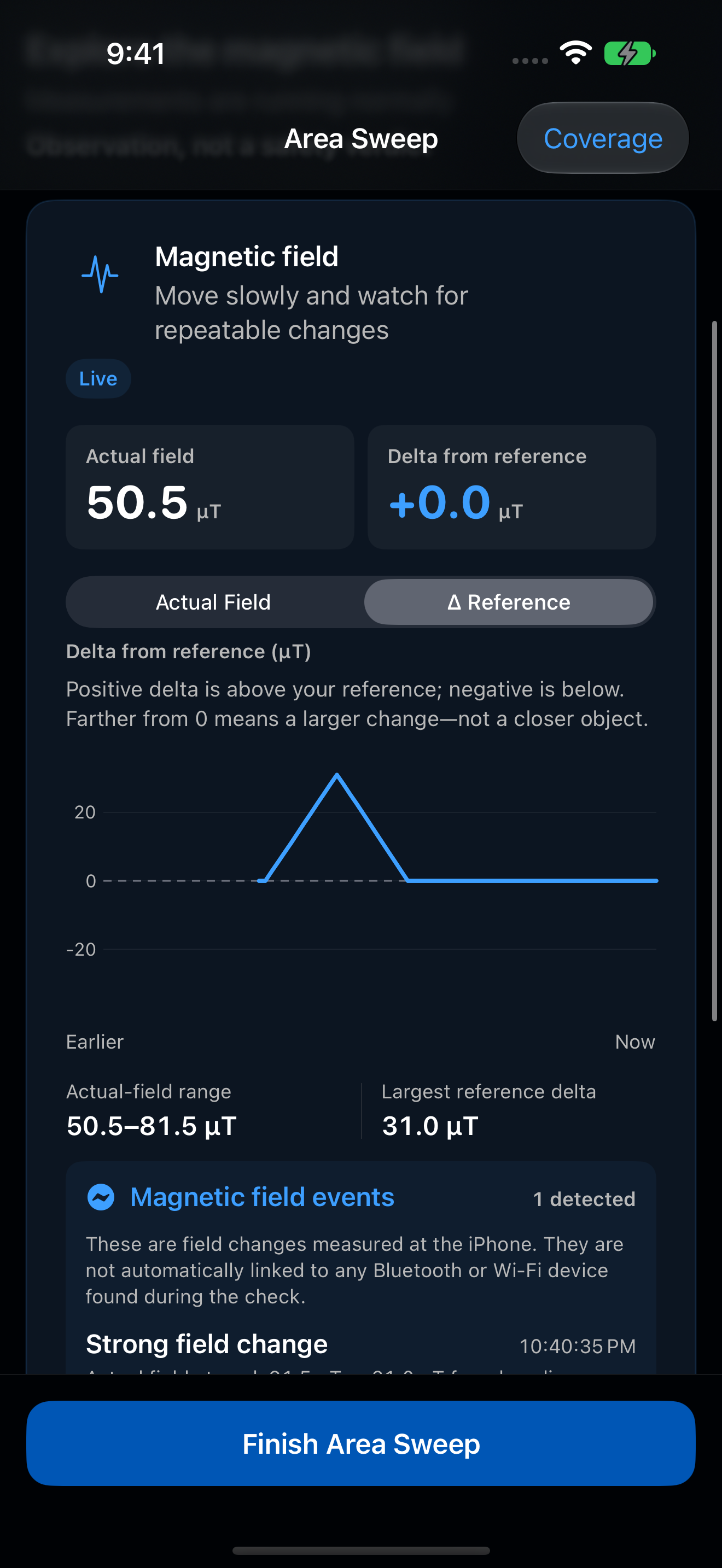
Why a visible change may not become an event
Automatic spike detection uses calibrated samples, a noise-adaptive threshold, persistence, and strong-spike rules. Small fluctuations or poor-quality measurements may not qualify. If calibration is limited, the actual-field trace can continue without automatic spike marking. Check Measurement Details; stale or unavailable readings are not a quiet field.
Completed magnetic sweeps can include Review graph, a bounded, downsampled history—not every measurement. Earlier readings may be omitted in long sweeps. A saved graph shows past measurements; it does not resume collection.
Keep the limits in view
Inspect safely and respect other people's privacy. Do not tamper with equipment or confront someone based on a magnetic change. A flat response does not rule out a device and is not a pass/fail test of your phone. Magnetic measurements are one source of context, not a hidden-camera detector or a safety certification.
For the complete measurement workflow, see the Spectra Guide. For missing or unexpected readings, see Troubleshoot missing devices and unexpected readings.
Back to top ↑