Which devices can run Spectra?
Spectra requires an iPhone running iOS 27 or later. The optional Experimental Watch companion requires watchOS 27 or later and a paired supported iPhone; the iPhone app works without an Apple Watch. Scanning and exports do not require Apple Intelligence. Only optional on-device analysis needs compatible hardware and enabled, available Apple Intelligence. Each measurement depends on its hardware and permission.
Can Spectra tell me a room is safe?
No. Spectra reveals available signals, not a safety verdict. Silent, powered-off, wired, shielded, cellular-only, or locally recording devices may not appear. Use findings as a reason to look more closely.
Do I need to connect to a device to inspect it?
No pairing or direct connection is needed. Local-network discovery requires joining the network and granting permission. Results depend on your chosen sources and device capabilities.
Does a product name confirm the device?
No. Names and metadata can be changed or spoofed. Matches are possible or probable identities, with the underlying observations available for review.
Do live counts show every nearby device?
No. Counts describe signal identities, not physical devices. Categories such as Watches & wearables depend on supported matches; other signals may remain unclassified. One device can broadcast several identities. iPhone scans use the same recognition rules for live counts and completed results. Finishing organizes the retained evidence; it does not run a stronger scan. Understand live counts and recognition limits.
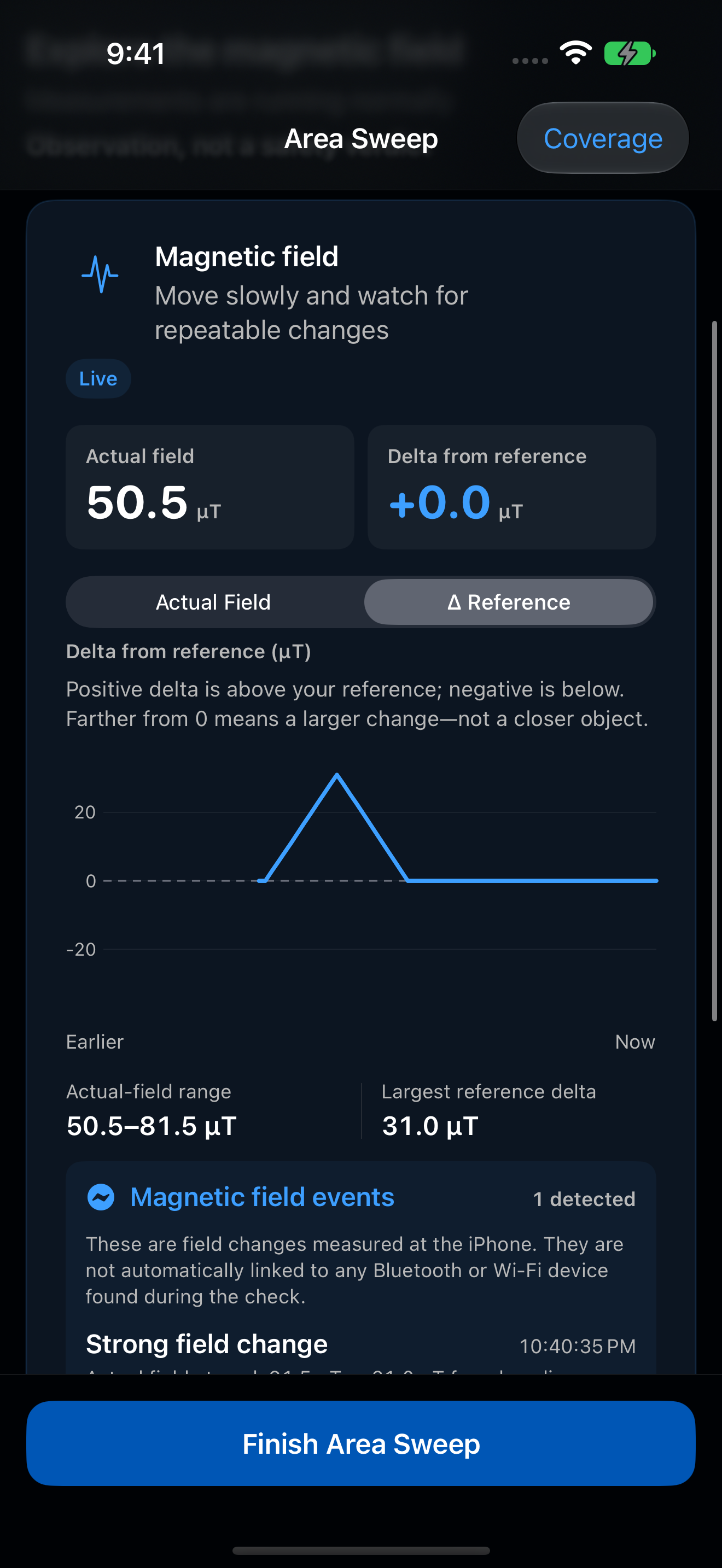
Why might the magnetic meter stay quiet near a known device?
The magnetometer measures at one small sensor, whose position varies by iPhone model. For iPhone 17 Pro Max, Apple’s drawing places the compass near the lower back at the USB-C end—not the camera area. Spacing, orientation, shielding, and magnetic accessories affect the response, and some devices produce little detectable change. No change does not rule out a device.
Before exploring an unfamiliar space, choose Practice with the magnetometer in the app’s magnetic Guide or sweep preparation. It uses live magnetic readings only, without radio scanning or saving a session. Compare an ordinary speaker you own with a spot away from electronics. Keep a gap and repeat the same slow pass; do not press magnets against the phone. This is familiarization, not calibration or a pass/fail sensor test. Stop Practice, Done, or leaving the app clears practice readings. Start a separate Area Sweep and fresh reference for the space you intend to review. Read the practice and positioning tips or see Apple’s model-specific compass drawing (PDF, page 5).
Can I collect signals from my Apple Watch?
Spectra includes an optional Experimental Watch collector: one intentional, 30-second Bluetooth Area Sweep. New captures save on Watch and automatically queue for your paired iPhone. Open Spectra on iPhone to identify the signals and add the result to Sessions. It is not a background scanner. Set the Watch’s Wake Duration to 70 seconds, tap to wake fully, and keep Spectra active; Always On alone is not enough. An interruption keeps a partial capture instead of claiming a full scan.
In Sessions, a Watch-with-radio-waves icon and Apple Watch · Bluetooth-only sweep label identify where the capture came from, even after renaming or rechecking. This is a general Bluetooth sweep collected on your Watch, not a search specifically for nearby watches. Experimental and partial-capture status remain visible.
On Watch, Settings holds sweep guidance, storage and transfer information, diagnostic reports, installed version details, and the optional completion haptic. The start screen stays focused on starting a sweep; the tray opens Saved sweeps.
Transfers may wait for connectivity or Apple’s scheduling. Settings → Experimental Watch on iPhone provides status and retry controls. The Watch does not scan local networks, measure magnetic fields, or run specialist modes. Experimental behavior continues to be evaluated across Watch models and environments. Review capture coverage and transfer status rather than assuming a complete sweep. Read setup, transfer, and privacy details.
Can I capture without my iPhone nearby?
Yes. After installing the Experimental Watch companion and opening Spectra on your paired iPhone once to prepare transfer, you can leave the phone behind. The Watch uses its own Bluetooth radio and saves locally; collection needs no internet connection or cellular plan. Bluetooth access and a fully awake, active Spectra screen are still required.
Check Saved sweeps before leaving: the Watch holds up to five captures in total, including earlier copies. Unsent captures are not automatically overwritten. Only safely received copies can make room automatically; if none can be replaced, free storage before another sweep. Reconnect and open Spectra on your paired iPhone to identify signals and review findings. The Watch shows capture status, not identified results. Read the Watch Guide.
How can I manage saved checks?
Use Search sessions at the bottom of Sessions to find saved names, notes, check types, and sources. Filters narrow by type, collector, or Imported status—not device names or raw payloads inside captures. Search Guide searches help separately. With automatic iPhone saving off, Save Session keeps one completed check without changing your preference.
Open Storage → Session Storage → Largest Sessions to compare estimated sizes. Every saved copy, including rechecks and imports, appears independently. Deleting there requires confirmation and has no Undo; estimated size may differ from reclaimed space. In the main Sessions list, choose Select and use Export to review a ZIP containing only your selected copies. Search and filters stay fixed while selecting; an original does not include rechecks automatically. Location tags remain excluded by default. Exporting does not remove history, and Import Sessions can restore a supported Spectra ZIP after review.
Erase All Sessions is in Session Storage and includes all saved history regardless of search or filters. Saved sessions are never removed automatically. For an optional short touch when an iPhone check ends, enable Completion haptic in Settings → Preferences. It is off by default; feedback does not confirm saving, complete coverage, or a safe area. Read the saved-session Guide.
Can I save where a check took place?
Yes. Tag location is an optional choice before each iPhone check and starts off every time. With your permission, Spectra tries to save one position near the start, together with its accuracy and fix time. Scanning still works if location is unavailable or you decline access. No route, background location history, or street address is collected. Watch captures stay untagged.
Review the saved coordinates and accuracy in the session. The first tagged result offers Enable map previews or Not now. Enabling allows automatic Apple Maps previews of saved areas without requesting your current position. Declining is remembered without repeated prompts. Change Automatic map previews in Settings, under Session maps. Its marker and shaded area describe the collecting iPhone and estimated accuracy—not detected devices or a verified venue. Open in Maps is a separate choice. If a preview cannot load, the coordinates and findings remain available.
Remove location removes the tag from that session copy only. All JSON formats omit it by default. Include scan location adds it to a single-session export when you explicitly choose; a collection uses Include scan locations. On-device finding analysis and external finding shares or copies never include the tag. Learn about location tags and saved copies.
Are recognition improvements included?
Yes. We regularly improve Spectra’s device catalog and detection engine to help you make better sense of nearby signals. These improvements are included in App Store updates at no additional charge—no separate catalog purchase or subscription.
Install the latest app update to use newer recognition. It can also help you revisit eligible saved sessions with Recheck session, preserving the original. Updates do not guarantee a match or make every device detectable. Learn about saved-session rechecks.
Why might a saved session have no recheck option?
Recheck session appears only when newer compatible recognition is available and the session retains enough usable radio evidence. A fresh capture already using the installed recognition normally needs no recheck. Some older or incomplete captures cannot be reassessed. Catalog updates arrive with app releases—not separate downloads. Rechecking needs no Apple Intelligence and cannot recover missing measurements or tell you what is at that location now. See eligibility, naming, and storage details.
Does resetting Spectra also erase Watch captures?
Reset Spectra on iPhone clears local sessions and settings, then requests erasure of captures, diagnostics, and settings in the known paired Watch app. An offline Watch may retain data until it receives and completes that request. Review Watch reset pending or Watch reset confirmed in Spectra’s iPhone Settings. Erase All Sessions, in Session Storage, clears iPhone history and received inbox captures only; it does not request a Watch reset. Files already exported elsewhere remain. Read reset and recovery guidance.